Game & UI Design
Bloodborne Quick Items Screen Rework
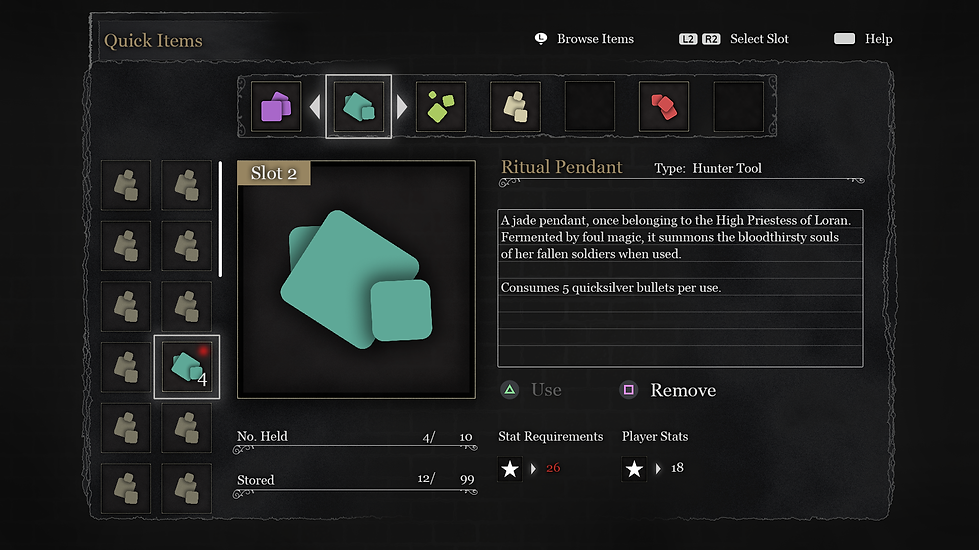
Detailed visual mockup of the updated Quick Items-screen.
About This Project
A revision of Bloodborne's quick item menu, which I did as a personal project.
Bloodborne is an excellent action-RPG and one of my favorite games. I have created an updated UI for its Quick item menu as a personal project.
The menu is designed to bind a set of inventory items to a limited number of quick item slots that can later be accessed directly in-game.
What are the problems with the original quick items menu?
- Every single quick item slot has a separate, identical menu
- A lot of information that is irrelevant for consumable items (player level, equipped runes, most player stats)
- You can see in the menu which items are selected as quick items, but not to which specific slot they are bound to, making item organization unnecessarily confusing
The revision allows for a more effective overview and control over all quick item slots on one screen, avoiding the display of irrelevant information.
By providing a more effective overview, the system fits better with Bloodborne's fast paced gameplay, as the game does not pause during the menus.
This work is a non-profit design project.
It is not affiliated with From Software or Bloodborne.
Clickthrough of the Quick Items-menu

Initial sketch of the revised menu
The item list on the left was later replaced with two rows of item icons to save space and avoid duplicate descriptions